• Removed user
    April 20, 2023, 12:24 p.m.

    Thanks for posting this, Annie.

    In the meantime, I also tried the new LR AI noise reduction.

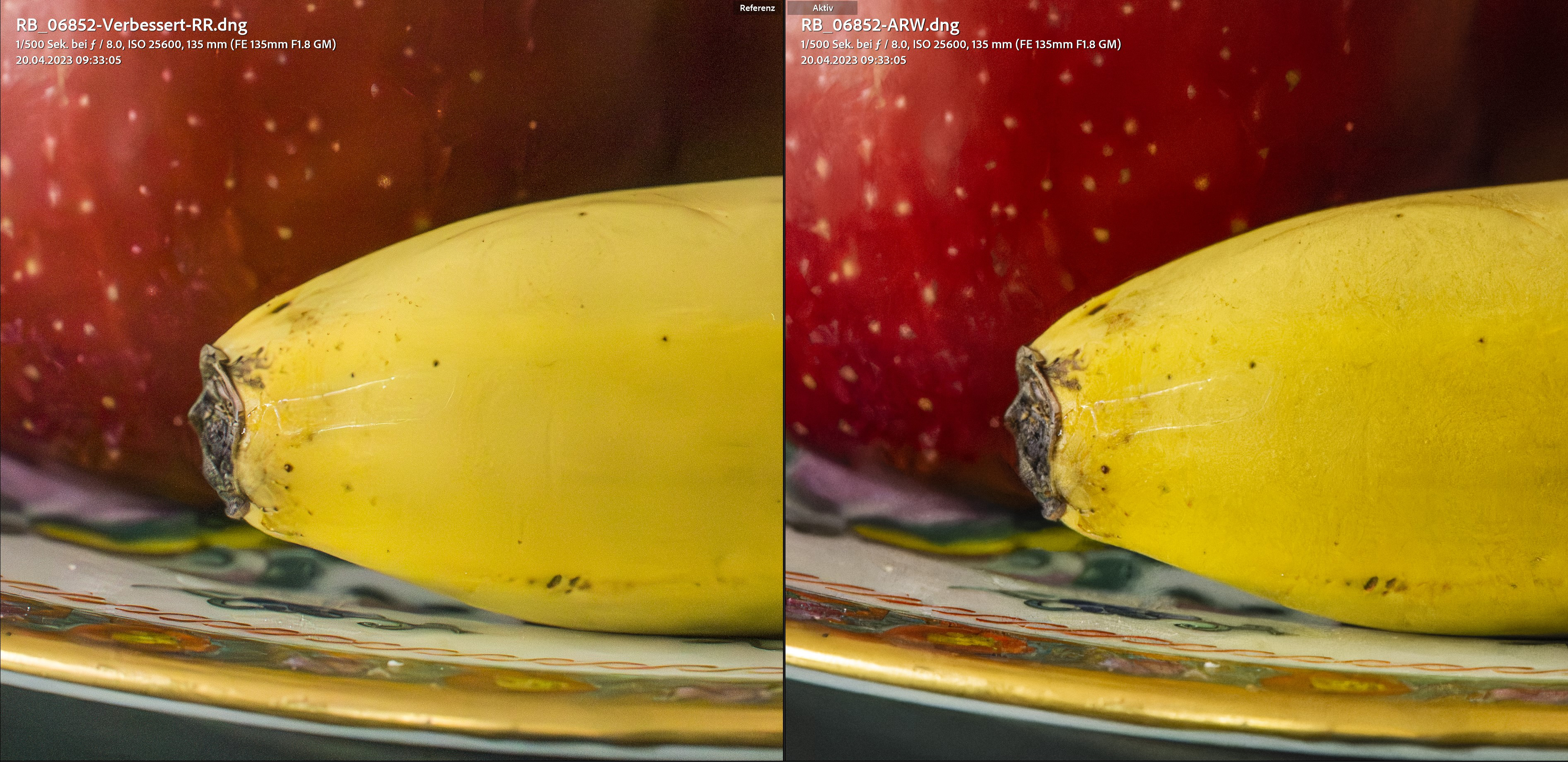
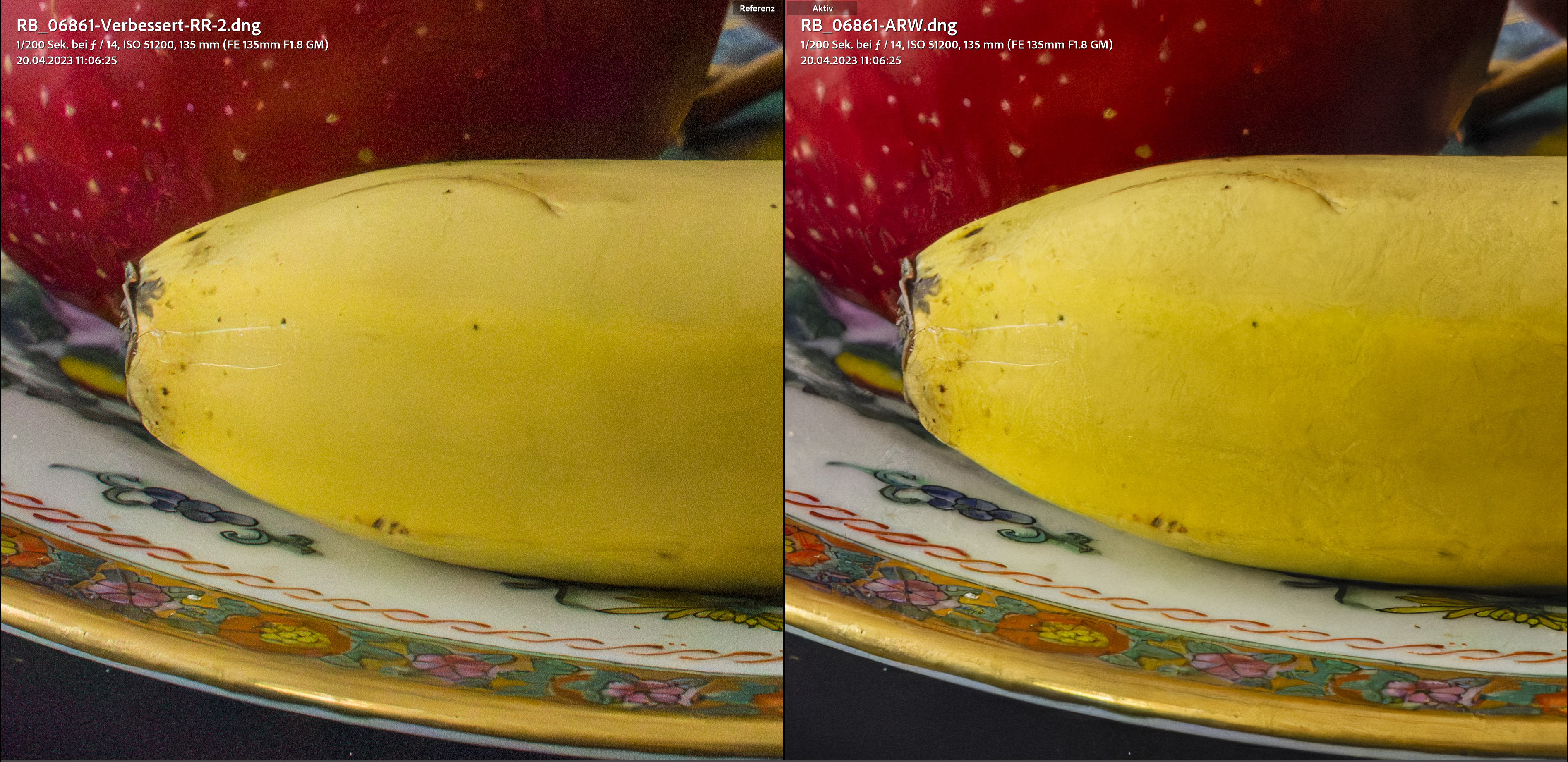
    To start with, it can be said that both software deliver excellent results. Both exceed the expectations one would have had a short time ago.

    The first thing I noticed was that the processing in LR is significantly (2-2.5x) faster than with DXO PureRaw V3 on my system.

    The surprisingly big differences to what you and others reported are probably not only due to the hardware but also to the graphics drivers used.

    My system:
    11th Gen Intel(R) Core(TM) i7-11700K @ 3.60GHz 3.60 GHz (pushed to 4.30 GHz), 128 GB RAM, Grafic card: AMD Radeon RX 6700 XT

    I don't use the standard AMD graphics driver but their PRO version which is optimized for image processing.

    LR AI NR version compared to untreated ISO 51200 version:
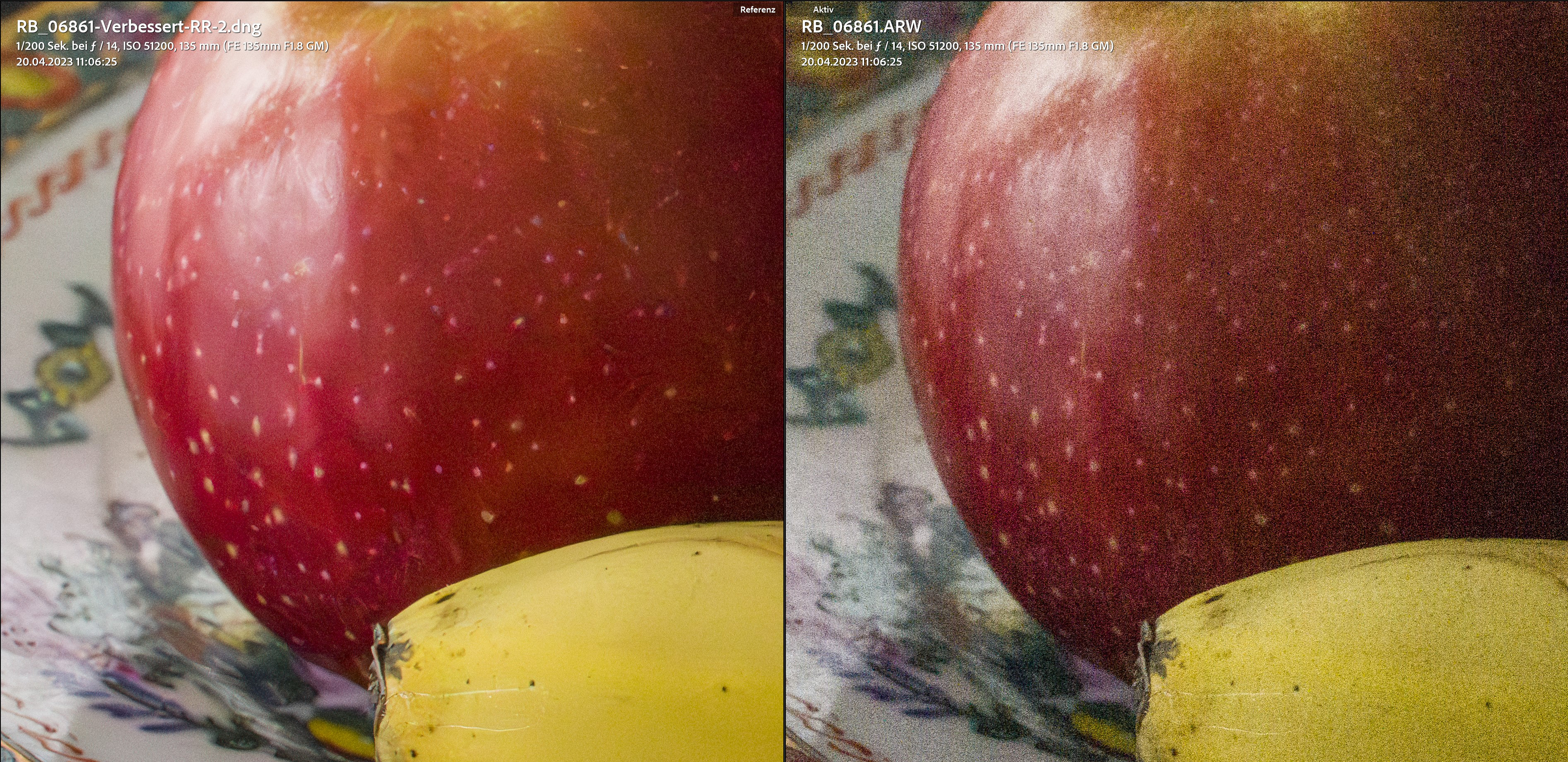
    rebafoto.ch/dpr/ISO_4.jpg

    Comparison at ISO 25600 (LR left, DXO right):
    rebafoto.ch/dpr/ISO_3.jpg

    Comparison at ISO 51200 (LR left, DXO right):
    rebafoto.ch/dpr/ISO_2.jpg

    rebafoto.ch/dpr/ISO_1.jpg

    ISO 25600, LR
    rebafoto.ch/dpr/LR_25600.jpg

    ISO 25600, DPXD
    rebafoto.ch/dpr/DPXD_25600.jpg

    ISO 51200, LR
    rebafoto.ch/dpr/LR_51200.jpg

    ISO 51200, DPXD
    rebafoto.ch/dpr/DPXD_51200.jpg

    ISO 51200, LR
    rebafoto.ch/dpr/LR_51200 (2).jpg

    ISO 51200, DPXD
    rebafoto.ch/dpr/DPXD_51200 (2).jpg

    Conclusion: I probably won't update the DXO software anymore, because the LR AI NR is (almost) on par with the DPXD version. It even looks like LR produces less artifacts, but also leaves a little more noise (not problematic). Minor weaknesses of the LR version will surely be ironed out in the future. The above examples are extreme anyway, and in real life I very rarely shoot above ISO 12800, and since LR processing is so much faster on my computer, the choice really isn't hard.

    Tip: All those who want to decide between the two versions should carry out their own tests because concerning the speed of processing the results from machine to machine can be very different.

    Best wishes,
    Reto

  • Members 360 posts
    April 21, 2023, 5:19 a.m.

    Great comparison! Thank you.

    From time to time, DXO does better, but also it butchers some details or creates artifacts.
    I do wonder though:

    I dowsize most of my photos to 4k display.
    Many artifacts get lost, as well as some noise. If the photo is still less ideal, either noisy or with small, but notable artifacts, what's better choice.

  • Removed user
    April 21, 2023, 7:02 a.m.

    Thank you. I am glad you like my comparison. It's true that DeepPRIME XD produces more artifacts than LR AI Denoise. But especially if you are downsizing, it doesn't really matter whether you use DXO or Lightroom. If you already have one of the two, you don't need the other. For me it's clear that I will not update Pure Raw anymore.

    Alex Armitage also came to the same conclusion as me and also compared with Topaz and ON1. LR beats them all and if you already have LR, this update is already included in the subscription at no additional cost. No need to buy any third party NR software anymore. Click here to view his video.

    Cheers,
    Reto

  • Removed user
    April 21, 2023, 12:56 p.m.

    Important New Findings

    It also seems to play a big role which camera is used. Today I did tests with photos from my Ricoh GRIII and here Denoise from Lightroom failed completely! But the result of DxO DeepPrime XD came out very well... I tried with different photos of the GRIII with always the same result: DxO very good, Lightroom total failure.

    After this test I revise my earlier statement: I also keep PureRaw always up to date as long as the results are like that.

    GRIII, ISO 12800, untreated
    rebafoto.ch/dpr/RI002451.jpg

    GRIII, ISO 12800, LR, To say that this is very bad would be an understatement!
    rebafoto.ch/dpr/RI002451-LR.jpg

    GRIII, ISO 12800, DxO, much better, yes I dare to say: comparably very good! It would maybe be even better by using the previous version of DeepPrime.
    rebafoto.ch/dpr/RI002451-DxO.jpg

    I have no idea why this is like that because apart from LR AI Denoise the GRIII-files work very well in Lightroom and I never had any problems at all. But this clearly shows that individual Denoise tests must be made to draw the right conclusion!

    I hope this helps.

    Cheers,
    Reto

  • Members 260 posts
    April 21, 2023, 6:32 p.m.

    yet again people continue to mix PureRaw with PL6 ... a normal comparison shall state clearly - here is a "batch level" (means spray and pray) conversion between ACR/LR vs PureRaw @ default settings ... does it make any sense for somebody who actually tune NR parameters ? no

  • Members 457 posts
    April 21, 2023, 6:59 p.m.

    I can replicate the issue with GR III. Adobe's version does not apply relevant NR when using GR III files in any setting. So you should file a bug with Adobe. The reason could be that Ricoh applies NR to the raw file (according to P2P). Still, it should work as DxO shows.
    Raw files from Nikon Z fc (also an APS-C) show a similar level of NR between DxO and Adobe once Adobe's slider is tuned to match the default of PureRAW (which may or may not be the best option).

    Looking over experiences on various forums, it seems the best to own DxO as well, run either Adobe or DxO first (whichever runs faster), and then run the other tool if unhappy with the first attempt.

  • Members 360 posts
    April 22, 2023, 3:57 a.m.

    Can't run both. After DxO, the LR denoise gets disabled. At least in my case.

  • Members 360 posts
    April 22, 2023, 3:59 a.m.

    I process my photos individually, and I am not alone. Spray and pray is not the way of many people. I don't want to process, store, and think about presentation or even personal reviewing of such photos.

  • Members 457 posts
    April 22, 2023, 4:36 a.m.

    Adobe's AI NR cannot run on linear DNGs (not yet).

  • Removed user
    April 22, 2023, 5:44 a.m.

    Thank you. Yes, I agree with your comment. For the moment it's best to stick to both programs. And I will file a bug report to Adobe.

    Cheers,
    Reto

  • Members 184 posts
    April 25, 2023, 8:03 a.m.

    It can't even do tiffs returned from Photoshop.
    I stacked several nightscape images in Photoshop to reduce noise and returned them to Lightroom, and thought I could do more AI denoise, but Lightroom refused.
    Not sure why it's so limited.

  • Removed user
    April 25, 2023, 9:11 a.m.

    That's only temporary. On the Adobe blog they mention that more file formats will be added. Right at the bottom of the blog they say:

    "Denoise is our third Enhance feature. We’re proud of what it can do today, but we’re already looking ahead to make it even better. For instance, we have some ideas on how to use additional training data to improve resolution. We’d like to support additional file formats and combine Denoise with Super Resolution. We’re even looking into ways to speed up the workflow by not needing to make a new DNG file. It’s a very exciting time, and you can expect us to continue making big strides forward in AI-powered image editing."

    Cheers,
    Reto

  • Members 360 posts
    April 25, 2023, 5:55 p.m.

    Splendid! 😂
    Really exciting to see what's coming next.

  • Members 535 posts
    April 25, 2023, 7:11 p.m.