Yes, they are not identical. I forgot that the DxO generates different frames than the original (wider angle). I have fixed it.
I typically always used defaults with DeepPRIME XD. I played with the three DxO sliders but did not see much improvement from what I got from the default.
LrC has only one slider (enhance amount), which is much simpler.
Looks like the Adobe AI Denoise offering performs similarly to DxO DeepPRIME (default settings) from the below comparison (However DeepPRIME is much faster):
When comparing performance, let's report the computers that we are using. That will help users who have similar hardware.
On my Mac Studio with M1 Ultra, Adobe is twice as fast as DxO.
Mine is a HP PC with Nvidia 1050. I wonder if you are using M1 Apple Neural Engine or GPU in DxO? People from DPReview Retouching forum are not reporting this finding.
Thank you for the tip. I used the default (Neural Engine). I switched to GPU and restarted PhotoLab. I see no difference in runtime.
How do you time it? I measure the time from starting the export to Lightroom until it finishes (Export as DNG, NR, and optical corrections only).
Edit: I am measuring PhotoLab 6.5.1.49 using Deep PRIME XD.
DxO reports the time it takes in the export window below (2x seconds is DP, 5x seconds is DPXD). I tried exporting to JPEG or DNG, all corrections applied or optical corrections only. There are no significant differences among these settings.
I'm going to share a few pairs of photos made with minimal exposure. In each pair, one photo was processed in Lightroom Classic (LrC) without using AI Denoise. The other was made in LrC with AI Denoise. I used the copy settings tool to make both photos as similar as possible with only the new denoise tool being the difference.
[Nikon D500 at 460mm, f/5.6, 1/30, ISO 3200 - NO AI Denoise]
[Nikon D500 at 460mm, f/5.6, 1/30, ISO 3200 - YES AI Denoise]
[Nikon D500 at 500mm, f/5.6, 1/60, ISO 6400 - NO AI Denoise]
[Nikon D500 at 500mm, f/5.6, 1/60, ISO 6400 - YES AI Denoise]
This last pair of photos was made about 18 months ago in September 2021. They're the same composition with processing the same except the second photo has AI Denoise applied. Note the exposure and ISO settings used.
[Nikon D500 at 70mm, f/4, 1/4, ISO 100 - NO AI Denoise]
[Nikon D500 at 70mm, f/4, 1/250, ISO 6400 - YES AI Denoise]
When I get some time I'll do a comparison with On1 NoNoise. I use M43 and I've found Noise Reduction is important tool at 6400 or higher I so.
Just tested on a Poison Dart Frog image, My system has an AMD Radeon RX 6700 XT GPU with 12 GB memory. Took about 5 or 6 seconds to complex the DeNoise using 100% of the GPU memory.
I went back and ran against a few of my High ISO shots nd will likely start using this versus Topaz. It will be interesting to see if this is an option in combination with Adobe's masking capabilities.
It was the basics back then, when standard denoise was applied. Denoise and blur the hell out of it where appropriate.
You guys, give me headaches. 😅
Not very long ago, I bought a new laptop qualifying for serious work. I thought I don't need dedicated GPU. Oof. DXO takes like 4-5 minutes to denoise, LR about 3min. That stinks, even with 8C/16T CPU.
Big biig mistake.
Upon testing, LR still trades blows with DXO. Sometimes DXO brings seemingly more detail, but more often than not, it is just an artifact guessed well enough that it fits into the detail bracket from time to time. LR is tiny teeny behind, but no artifacts on first sight.
In my test on an ISO 25,600 image of a person in a dark event space, above 50% it generated that telltale "watercolor" smearing effect in fabric wall covering next to the subject. At 50% this was better, but results on the OOF background were slightly less clean than DeepPRIME XD at default 40%. OTOH, at 50%, skin tone was smoother than DPXD even when I turned off DxO's Lens Sharpness. Overall, Denoise won on skin tone, but DPXD won on the surrounding environment. Nonetheless, I was extremely impressed by Denoise.
I expect it will get better, giving DxO some stiff competition. However, it's SLOW. On my M1 Mac mini with a 42MP RAW, it took 1:52, whereas DxO took 0:42 for DPXD and just 0:10 for plain ol' DP.
A lowly XPS-17 here, 30mp files, it takes about 20 seconds, and the results are impressive. The latest file I tried was a strongly pushed ISO 1600 file, more like ISO 6400. DXO does a great job as well but LR has superior processing - color, shadows, highlights, etc. No need to create a DNG in DXO and pass it to LR anymore.
In the meantime, I also tried the new LR AI noise reduction.
To start with, it can be said that both software deliver excellent results. Both exceed the expectations one would have had a short time ago.
The first thing I noticed was that the processing in LR is significantly (2-2.5x) faster than with DXO PureRaw V3 on my system.
The surprisingly big differences to what you and others reported are probably not only due to the hardware but also to the graphics drivers used.
My system:
11th Gen Intel(R) Core(TM) i7-11700K @ 3.60GHz 3.60 GHz (pushed to 4.30 GHz), 128 GB RAM, Grafic card: AMD Radeon RX 6700 XT
I don't use the standard AMD graphics driver but their PRO version which is optimized for image processing.
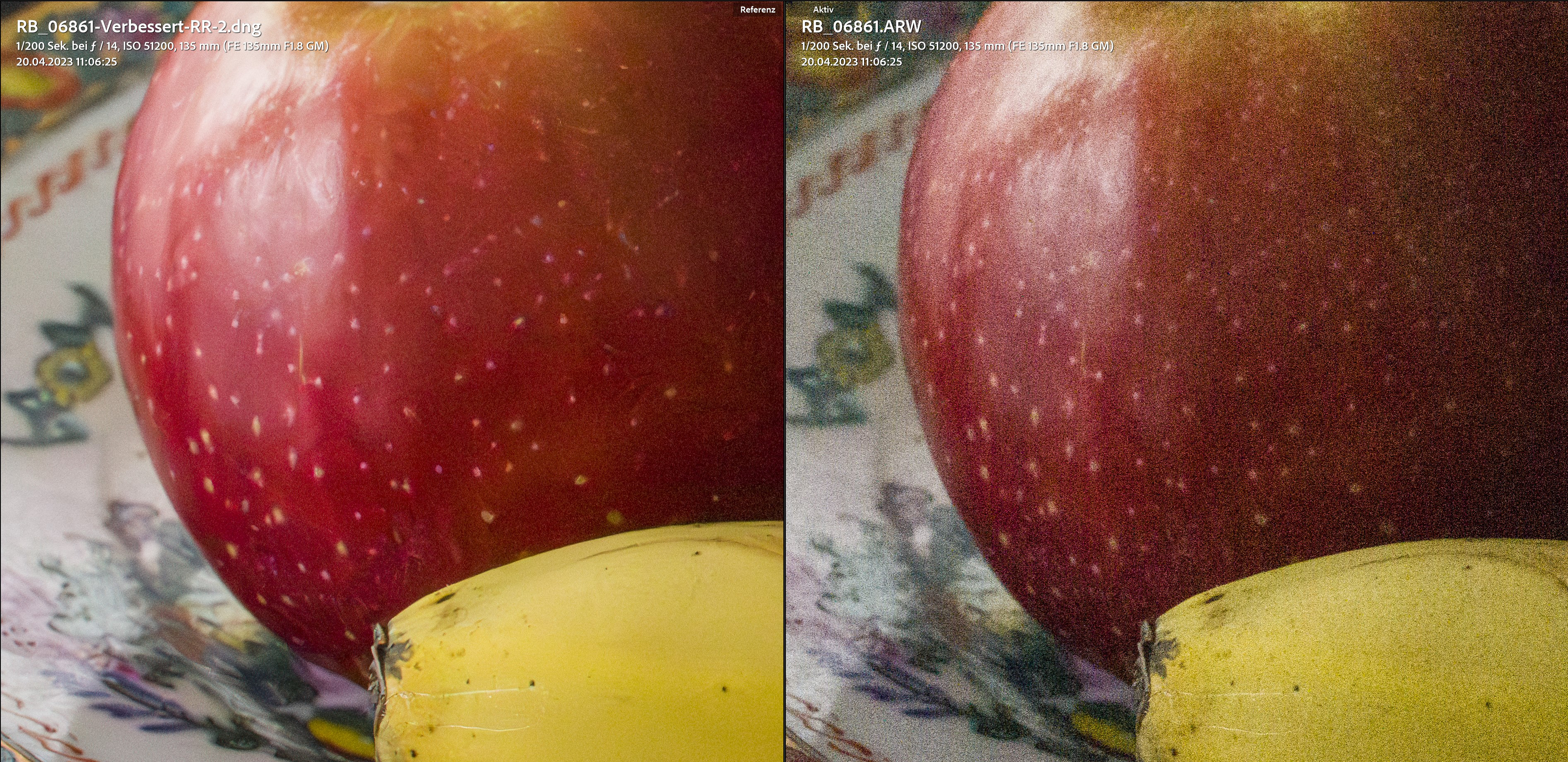
LR AI NR version compared to untreated ISO 51200 version:
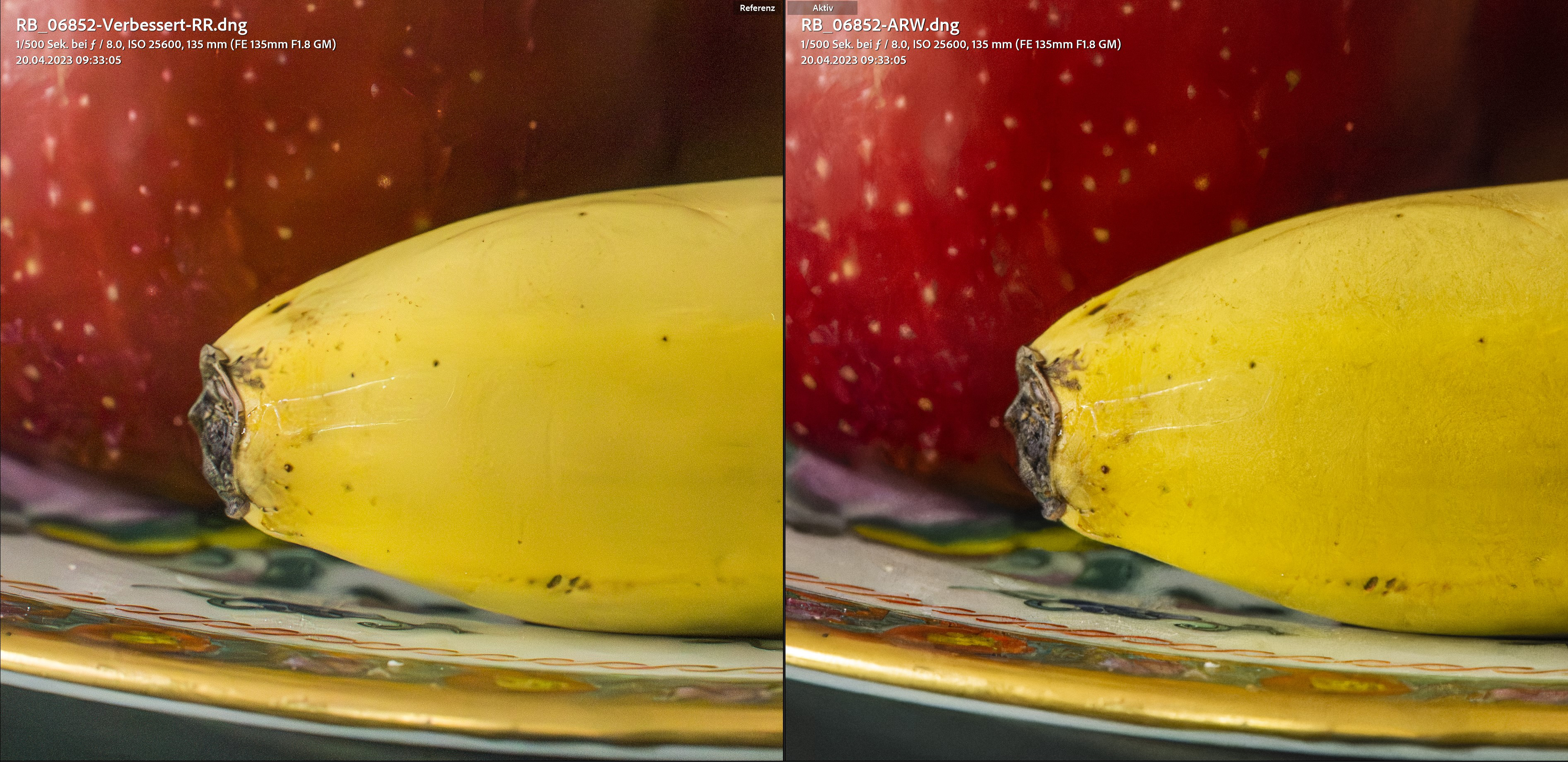
Comparison at ISO 25600 (LR left, DXO right):
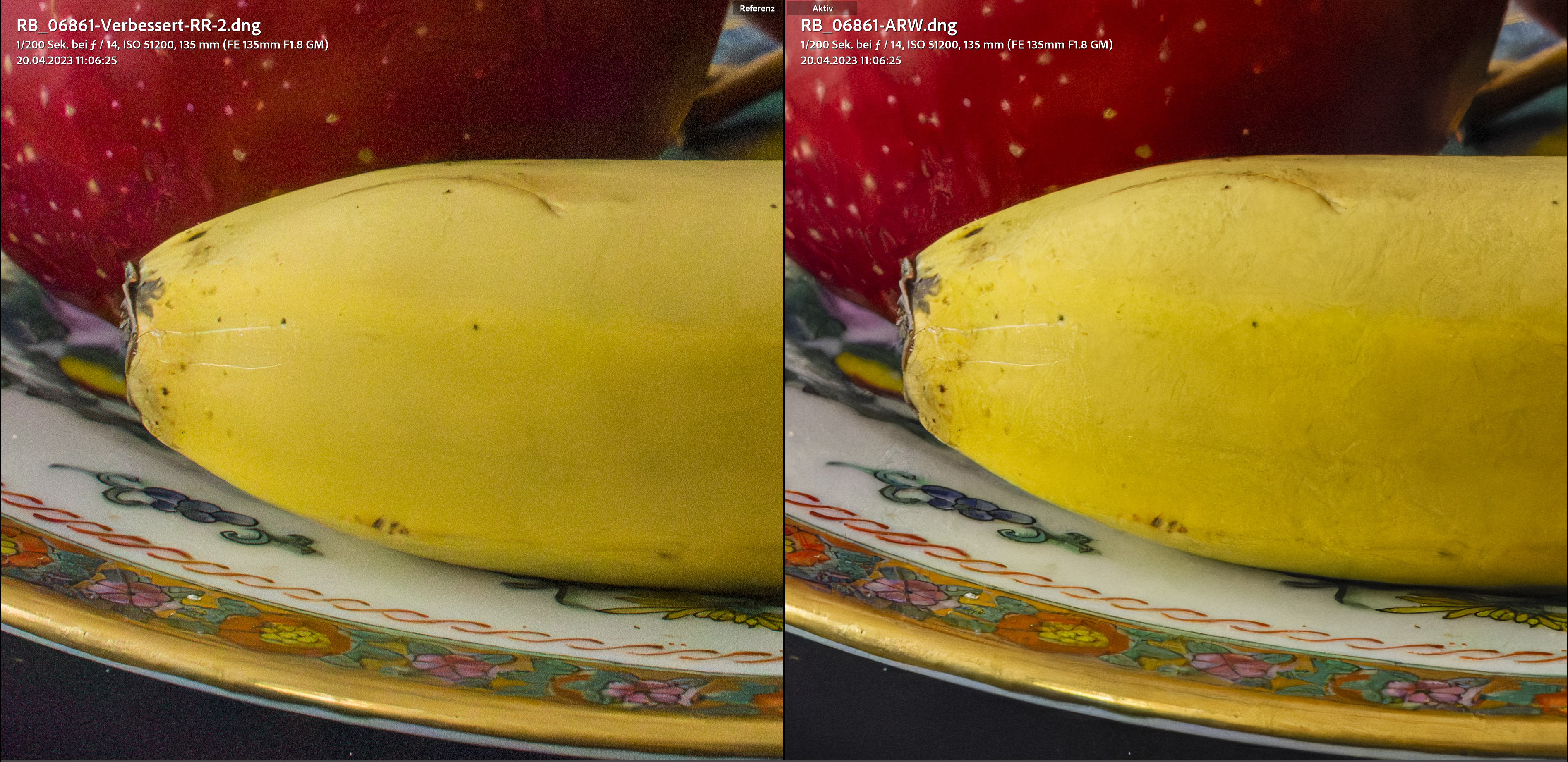
Comparison at ISO 51200 (LR left, DXO right):
ISO 25600, LR
ISO 25600, DPXD
ISO 51200, LR
ISO 51200, DPXD
ISO 51200, LR
ISO 51200, DPXD
Conclusion: I probably won't update the DXO software anymore, because the LR AI NR is (almost) on par with the DPXD version. It even looks like LR produces less artifacts, but also leaves a little more noise (not problematic). Minor weaknesses of the LR version will surely be ironed out in the future. The above examples are extreme anyway, and in real life I very rarely shoot above ISO 12800, and since LR processing is so much faster on my computer, the choice really isn't hard.
Tip: All those who want to decide between the two versions should carry out their own tests because concerning the speed of processing the results from machine to machine can be very different.




.jpg)
.jpg)